
Oil Field Dash Cams: Remote Route Incident Review
25 Sep 2026
driver coaching


Improve fleet safety, reduce operating costs, and optimize field performance with an easy-to-use platform for video, GPS tracking, driver coaching, maintenance, asset tracking, and real-time fleet insights.
-1.png)




A GPS dot on a map tells a dispatcher where a vehicle stopped. It does not tell them why. The driver sat for forty minutes on a job that should have taken twenty. Did the customer change the scope? Did the truck break down two blocks away? Did the driver take a long lunch? Without video context, the dot stays silent, and the dispatcher has to call or wait.
This gap matters more than most vendors admit. Legacy telematics platforms built their pitch around location data: coordinates, speed, geofences, trip history. Useful tools, all of them. But commercial fleets running field service, construction, or last-mile routes have learned that location without context creates as many questions as it answers.
A fleet camera solution with GPS integration changes the equation. When the camera and the GPS share a data layer, a harsh braking event becomes a clip with location, speed, and g-force attached. A long job-site stop becomes something a dispatcher can visually confirm. An arrival dispute with a customer becomes resolvable in minutes, not days. The data gains a second dimension, and the dispatcher gains real operational leverage.
The phrase "GPS-integrated fleet camera" gets used loosely in vendor marketing. Some vendors mean the camera records GPS coordinates in metadata. Others mean full bi-directional integration: live map views linked to live and stored video, event triggers that combine g-force and location data, and a single platform where the dispatcher never has to leave one screen to reach the other. These are not the same product.
Understanding what tight integration actually delivers helps fleets ask the right questions before signing anything.
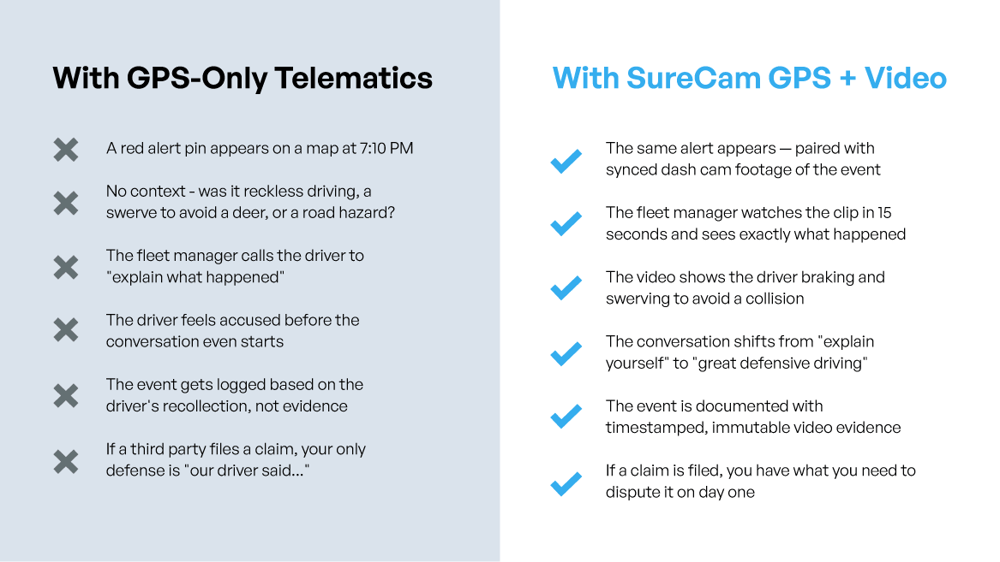
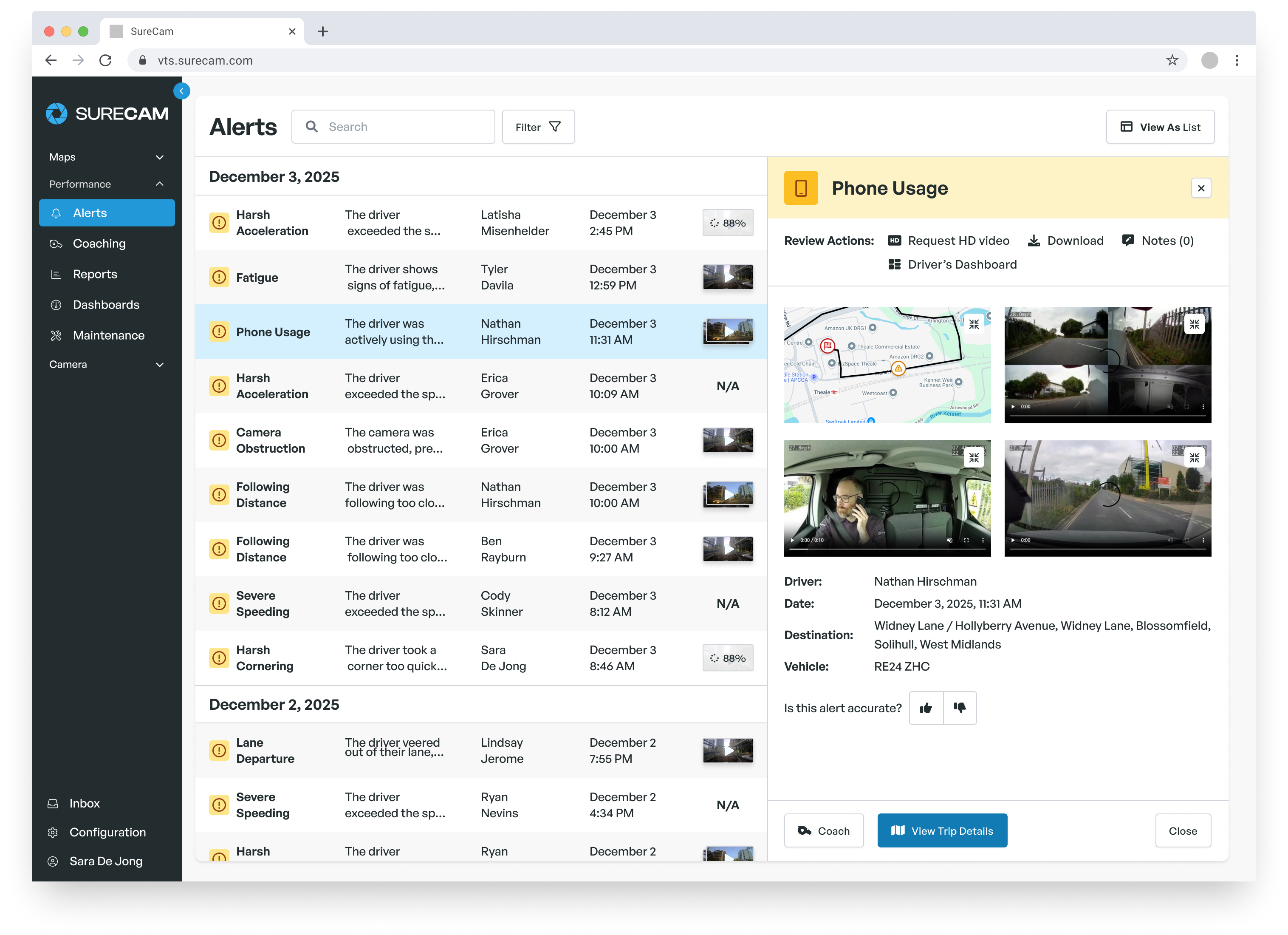
Network-connected fleet cameras use onboard accelerometers to detect harsh driving events: hard braking, rapid acceleration, sharp cornering, and collision-level impacts. When integration with GPS runs deep, those triggers fire alerts that bundle the event type, timestamp, location on a map, and the video clip from seconds before and after the event.
A dispatcher receiving that alert does not need to piece together what happened. The location shows whether the driver hit the brakes on a dangerous stretch of highway or in a parking lot. The clip shows whether a third-party vehicle cut in front of the truck or whether the driver was distracted. This is the version of "GPS and camera integration" that operationally matters: the event alert that arrives as a complete picture rather than a data fragment requiring manual investigation.
For liability purposes, the GPS timestamp and location metadata embedded in the clip also matter at claims time. An insurer or attorney asking where the vehicle was, how fast it traveled, and exactly when the event occurred gets a single verified file rather than a stack of separate exports requiring manual correlation.
Field service and construction fleets carry a persistent dispatcher headache: confirming that vehicles arrived on time, departed when they should have, and completed the work they claimed. GPS provides arrival and departure timestamps. Cameras add visual confirmation of what happened at the location.
For fleets running LiveCheck or equivalent live video capabilities, the dispatcher can pull up a real-time view of any vehicle in the field without calling the driver. A job site dispute with a customer ("your truck never showed up before 11") becomes verifiable in seconds with a GPS timestamp and a live or stored clip from the job location. A driver claiming site conditions prevented work completion can have that claim confirmed or questioned from the office without a supervisor driving out.
This combination matters particularly for fleets managing multiple crews across wide geographic areas. A dispatcher covering ten field service teams across a metro area cannot realistically call each driver to verify status. GPS location confirms presence. Camera access confirms activity. Together, they give the dispatcher enough operational certainty to make dispatch decisions and respond confidently to customer inquiries.
Fleet camera vendors have historically built their software for safety managers: desktop portals, event review queues, driver scorecards. Dispatchers have different priorities. They need fast answers while managing active calls, incoming jobs, and driver communications simultaneously. A tool that requires three menu levels to pull a clip will not get used during the actual moments it matters.
A dispatcher-facing mobile app for a fleet camera system has to meet a different standard than the back-office portal.
The core capability dispatchers reach for first: seeing a specific vehicle's current camera feed without calling the driver. Live view access through a mobile app lets a dispatcher confirm a driver reached a job site, monitor an active situation, or check conditions at a location before sending another crew out.
On-demand footage access serves the second most frequent need: pulling a clip from earlier in the shift to respond to a customer complaint or verify a reported incident. The clip should retrieve in seconds, not require a download request that populates hours later. For fleets evaluating vendors, the practical test is simple: ask a dispatcher to pull a specific clip from a specific vehicle for a specific time window during a demo, and time how long it takes. That latency number reflects real operational experience far better than any feature matrix.
Push notifications for trigger events complete the dispatcher use case. When a collision or harsh event fires, the dispatcher should receive the same alert the safety manager gets, with the location and clip attached. Waiting to hear from a driver about an incident means waiting too long.
Dispatchers work under constant cognitive load. A fleet camera app that demands training, navigation through complex menus, or multiple credential steps for each session will not get used at the moments it matters most. The interface needs to surface the most common actions (live view, recent events, vehicle location) without requiring a user to remember where to find them.
For fleet managers evaluating a system for dispatcher adoption, the practical questions are: Can a dispatcher who has never opened the app before find a specific vehicle in under sixty seconds? Can they pull a live view without assistance? Can they retrieve an alert clip and share it in a customer communication without downloading and reattaching files? If the answer to any of these requires a tutorial, the app will face adoption resistance the first time an urgent situation arises.
Connectivity reliability matters too, especially for fleets operating across rural routes or in areas with variable cellular coverage. A system that relies on WiFi upload rather than cellular transmission may fail to deliver footage precisely when the dispatcher most needs it.
Maneri Traffic Control operates 30+ vehicles across California highway work zones, a category of field operation where confirming driver arrival and remote job site visibility carries genuine safety stakes. The company lost two employees in the line of duty before making safety technology a priority. After switching to SureCam cameras with LiveCheck and GPS integration, the results were measurable: a 70% increase in team productivity, according to Maria Maneri, Co-owner.
The GPS and camera combination serves two purposes at Maneri that translate directly to the dispatcher use case. First, GPS timestamps verify arrival times at job sites, reducing the need for check-in calls and giving supervisors accurate data for customer billing and scheduling. Second, LiveCheck lets supervisors run randomized real-time safety audits from the office, pulling live video from any truck in the field without notifying the driver in advance. That capability both improved compliance and reduced the supervisory overhead of managing distributed crews.
The productivity gain reflects what happens when dispatchers and supervisors spend less time chasing status information and more time making operational decisions. When the fleet camera system provides real answers rather than data that requires follow-up, the whole operation runs with less friction.
When comparing fleet camera solutions with GPS integration and dispatcher-facing mobile access, the feature list rarely tells the whole story. These questions surface the operational reality behind the marketing.
On integration depth: Does the system pass GPS coordinates and speed data into the video clip metadata, or do GPS and video exist as separate data streams requiring manual correlation? Can the dispatcher see vehicle location and pull a live view from the same screen? Does the event alert include a map location, a clip, and supporting data (speed, g-force, timestamp) in a single notification, or does the dispatcher have to assemble that picture from multiple sources?
On mobile app quality: What mobile operating systems does the app support, and what version requirements apply? Can a dispatcher with no prior training retrieve a specific clip within sixty seconds? Does live view require a WiFi connection, or does it work over cellular? How does the app perform in areas with weak signal?
On US connectivity: What cellular network or networks does the system use for data transmission? Does the vendor have documented reliability data for the regions where the fleet operates? What happens to footage when a vehicle travels through a coverage gap: does the system buffer and upload automatically, or does the footage drop?
On footage retrieval speed: How quickly does a triggered event clip appear in the portal after the event fires? Is on-demand footage retrieval instant, or does it require a request that populates with a delay? Event footage that arrives four hours after the incident does not help a dispatcher manage an active situation.
A fleet camera solution with GPS integration and a functional dispatcher app should reduce the number of calls a dispatcher makes to drivers, not increase them. When the system works as described, the dispatcher knows where every vehicle sits, what happened at the last event, and what any active job site looks like, all without picking up the phone.
The gap between vendors on this specific capability is wider than the spec sheets suggest. Requesting a dispatcher-oriented demo, putting a current dispatcher in the room to run through real scenarios, and testing footage retrieval speed on the vendor's actual cellular network will reveal more than any comparison table. The right system pays for itself in hours recovered, incidents resolved faster, and customer disputes handled with evidence rather than guesswork. Want to see the difference between GPS alone and Dash Cams with GPS? Schedule a call with one of our experts today.