Oil Field Dash Cams: Remote Route Incident Review
25 Sep 2026
driver coaching


Improve fleet safety, reduce operating costs, and optimize field performance with an easy-to-use platform for video, GPS tracking, driver coaching, maintenance, asset tracking, and real-time fleet insights.
Drive your total fleet operations with SureCam’s all-in-one video telematics solution.
Valuable guides, case studies, and videos to help you optimize fleet management, safety, and productivity with telematics solutions.
Values, job opportunities, and ways to connect or partner with SureCam.
.png)




GPS told you where the truck went. It did not tell you what happened.
That gap cost fleets billions: in claims that dragged on without evidence, in accidents that repeated because no one had footage to coach from, in false injury suits that settled because the alternative was a courtroom fight nobody wanted to fund. Fleet managers who ran GPS-only programs knew their vehicles' locations down to the block. What they could not know, not until it was too late, was why a driver braked hard on Route 9 at 7:14 a.m., or whether the third-party claim about a sideswipe in a truck stop parking lot had any truth to it.
Video telematics closes that gap. This guide explains what it is, how it works, and what to look for when choosing a platform, whether this technology is new to a fleet or a replacement for something that has outgrown its usefulness.
Video telematics combines connected dash cameras with GPS tracking, telematics data (speed, g-force, acceleration, hard braking), and cloud-based video storage, all tied together through a software platform that lets fleet managers see, review, and act on what happens inside and around every vehicle in real time.
The word "telematics" has existed in fleet management for decades. Legacy telematics meant a GPS puck under the dash and a report that showed where vehicles had been. Video telematics means the same data stream now carries visual context. The location data and the video footage arrive together, triggered by the same event, stored in the same place, accessible from the same portal within seconds.
A standalone dash cam records to an SD card. Someone has to pull the card, physically transfer the footage, and review it manually, often 12 to 24 hours after an event. If the driver forgot to swap cards, or if the card was corrupted, the footage simply does not exist. In a dispute filed the next morning, a 24-hour footage gap may as well be no footage at all.
A video telematics system operates differently. When the camera detects a hard braking event or a collision impact through its built-in accelerometer, it immediately uploads the surrounding video clip to the cloud over a cellular connection. A notification hits the fleet manager's email or phone in seconds. The clip sits waiting in the portal before the driver has pulled back onto the road. No card to retrieve. No driver involvement. No gaps.
That speed matters. Insurance adjusters, attorneys, and third-party claimants move fast. A fleet manager with footage in hand within minutes holds a very different position than one still waiting for a driver to return to the depot.
Every video telematics platform, regardless of brand, runs on a version of the same three-stage cycle.
First, event detection. The camera's accelerometer measures g-force continuously. When a threshold is crossed (a sudden stop, a sharp swerve, a collision impact), the system flags the moment as a triggered event. More advanced systems layer AI detection on top, identifying tailgating, lane drift, distracted driving behavior, or stop-sign violations using computer vision rather than just g-force alone. Some platforms also allow manual event triggering through an in-cab panic button, useful for drivers who witness something serious that the accelerometer did not catch.
Second, instant upload. The triggered clip, typically 10 to 60 seconds of footage surrounding the event, uploads over the vehicle's cellular connection directly to cloud storage. No driver action required. Some systems also upload continuously in lower resolution for full-route recording, making footage available for any moment, not just triggered events.
Third, immediate notification. The platform sends an alert: email, SMS, or in-app notification, depending on configuration. The fleet manager, safety director, or dispatcher clicks through to the clip, reviews speed and g-force data alongside the footage, and decides what happens next: a call to the driver, a claim submission, a coaching session, or all three.
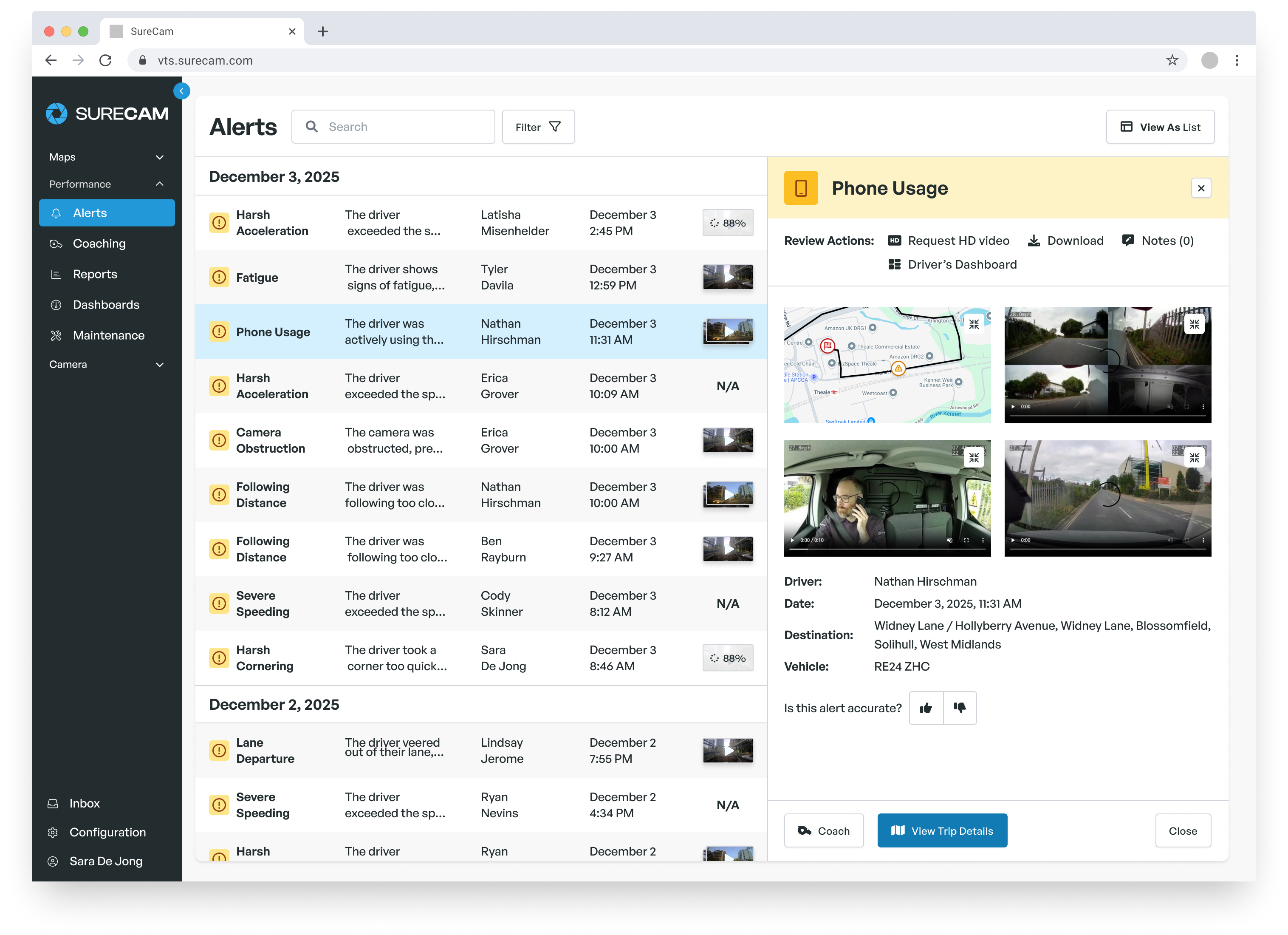
Beyond triggered clips, a video telematics portal gives fleet managers a live map of every vehicle, trip history, harsh event logs organized by driver or vehicle, and driver behavior scoring over time. The better platforms let managers pull any section of stored footage on demand, run reports on which drivers generate the most events, and share clips directly with insurance partners as part of First Notification of Loss (FNOL) workflows.
Camera configurations vary. Forward-facing cameras capture what happened in front of the vehicle. Dual-facing cameras add an in-cab view, useful for coaching distracted driving and verifying seatbelt compliance. Rear-facing and side cameras extend coverage to backing maneuvers, lane changes, and unloading zones. Multi-camera systems covering all four sides give high-risk fleets (construction, transit, utilities) full situational awareness for every incident type.
Every fleet that runs on the road long enough collects incidents: collisions, parking lot dings, third-party claims that may or may not reflect what actually happened. The difference between a fleet with video telematics and one without shows up most clearly in how those claims resolve.
Without footage, a disputed claim becomes a credibility contest. With footage, it becomes a fact-finding exercise. Sam Lansberry II, founder of Lansberry Trucking, an 80-truck operation running routes across the US and Canada, framed the return on investment plainly: "I don't view our investment in SureCam as a cost, it's a profit-center. Last year alone, our claims losses reduced by over 80%." That reduction followed a $550,000 claim, filed against Lansberry for an accident that was not the company's fault, which finally made the case for connected cameras undeniable. One wrongful claim of that size wipes out years of camera subscription costs. The math changes the moment a fleet experiences it.
Claims resolution speed matters too. Footage submitted to an insurer on the day of an incident compresses what might otherwise take weeks of back-and-forth into hours. Adjusters close files faster. Premiums stabilize. Subrogation recovery rates improve when liability assigns quickly and cleanly.
Cameras do not just document the worst moments. They document the near-misses, the habits, and the patterns that tend to produce the worst moments weeks or months later.
When a fleet manager gets a hard-braking alert with a clip attached, that clip becomes a coaching tool. Play it back with the driver. Show the following distance. Show the moment of decision. A 30-minute conversation built around footage lands differently than a lecture built around a data point. Drivers respond to seeing their own driving, not to hearing general safety reminders.
Over time, that coaching compounds. Reduced harsh braking events. Fewer speeding violations. Better following distances across the fleet. The system also creates accountability without surveillance theater: drivers who know events get flagged tend to adjust behavior, whether or not anyone is actively watching, because they understand the footage exists.
Commercial fleets attract staged accidents and inflated injury claims. A truck represents a solvent defendant. Plaintiffs' attorneys know fleet operators tend to settle rather than litigate. Video telematics changes that calculus.
When a third party claims a fleet vehicle caused an accident, footage either confirms it or refutes it. When footage refutes it, claims close. When footage confirms fault, fleets can focus on fast, fair resolution rather than prolonged litigation. Either way, the guessing ends. The footage tells the story the way it actually happened, not the way an opposing party wishes it had.
The benefits of video telematics extend beyond incidents. Route completion verification, arrival time confirmation, proof-of-service documentation, and real-time vehicle location all run through the same platform. Dispatchers see where every vehicle sits. Customer service teams can answer "where's my driver?" with precision. Managers can verify that vehicles stayed within authorized geographic zones.
This operational layer separates video telematics from pure safety tools. A fleet manager running SureCam gets cameras that protect against claims and a live map that keeps operations honest, all through one system and one monthly subscription.
GPS tracking tells fleet managers where vehicles go, how fast they travel, and when they stop. That data has real value for route optimization, customer ETAs, and basic driver accountability. For many small fleets in the early years of growth, GPS tracking delivered meaningful operational improvements.
The limitation surfaces in disputes. GPS shows the vehicle's location at the moment of impact. It does not show what the driver saw, what the other vehicle did, or whether the third-party account of events matches reality. A geofence alert tells a manager that a truck has left an approved zone. It does not explain whether the driver took a legitimate detour or made an unauthorized stop.
Video telematics layers context onto every data point. Speed at the moment of impact means more when footage shows the road conditions, the other vehicle's behavior, and the driver's response. A hard-braking event scored on a driver safety report means more when a manager can watch the clip and determine whether it reflected a dangerous following distance or an unavoidable hazard.
The combination of GPS data and video footage creates a complete event record, not just a location history. That record supports claims decisions, coaching conversations, customer disputes, and regulatory compliance documentation in ways that GPS data alone cannot.
The first decision shapes everything that follows. SD-card systems store footage locally on the device. Retrieving it requires a driver to physically remove and return the card, or a manager to pull the vehicle from service for a manual download. In practice, this means footage often arrives late, sometimes damaged, and sometimes not at all.
Connected systems upload over cellular networks automatically. Footage from a 7 a.m. incident sits in the portal by 7:05. No driver involvement. No retrieval burden. No gaps caused by card errors or overwriting. For commercial fleets where incidents are often contested within hours of occurrence, the speed advantage of connected systems directly affects claim outcomes.
The right camera configuration depends on what the fleet actually needs to document. A local delivery fleet concerned primarily with at-fault accidents and parking lot incidents may find a forward-facing connected camera sufficient. A construction fleet unloading at job sites needs multi-camera coverage to document what happens when drivers leave the cab. A passenger transport fleet with liability exposure inside the vehicle needs dual-facing cameras that capture both the road and the cabin.
Good platforms offer modular configurations rather than forcing all-or-nothing packages. Fleets should pay for the coverage they use, with room to expand as safety programs mature.
Footage belongs to the fleet that generated it. Full stop. Before signing any contract, verify that the platform's terms of service grant the fleet complete ownership of all video data, with no restrictions on access, export, or use in legal proceedings. Some providers have structured agreements that give themselves rights over footage or that limit how customers can share clips with insurers and attorneys. That arrangement serves the vendor, not the fleet.
Matt Jacobson, Director of Fleet Operations at SAV Express, specifically cited data ownership as a deciding factor when switching platforms: the prior provider "claimed the footage belonged to them and only shared it with SAV Express." Any clause along those lines disqualifies a vendor.
Most commercial fleets already run some form of telematics or ELD system. A video telematics platform that cannot integrate with existing infrastructure creates a parallel data environment that generates more work than it saves. Fleets should verify whether a platform integrates with their current telematics provider before committing, and should treat integration gaps as a meaningful disqualifier rather than a future roadmap promise.
Video telematics matters most in high-stress moments: immediately after an accident, in the middle of an insurance dispute, when a clip will not load, and a claims deadline approaches. The quality of vendor support in those moments determines the real-world value of the system. Ask prospective vendors specifically how fast they respond to urgent support requests, whether a dedicated contact handles ongoing account needs, and what support channels they offer beyond email ticketing.
Storage policies vary by platform. SureCam stores event video for up to 60 days, with 50 hours of rolling continuous video storage. Fleets with specific retention needs (for extended litigation timelines, for example) should confirm storage terms before signing.
No. Connected video telematics systems upload triggered event clips automatically over cellular networks. Drivers do not need to remove cards, press buttons, or interact with the camera after an event. The only exception: some systems include an in-cab panic button that drivers can press to manually trigger a clip when they witness or experience something the accelerometer did not flag.
Yes. Most enterprise-grade platforms include privacy controls. SureCam features include in-cab privacy mode (disabling the driver-facing camera except during button-push events), facial blurring for driver and passenger faces, location privacy zones where recording pauses automatically, and time-of-day privacy settings that disable recording outside business hours. These controls help fleets address driver concerns about surveillance during non-work hours or in sensitive locations.
Driver acceptance follows from transparency and consistency. Fleets that introduce cameras as a two-way protection tool, protecting drivers from false claims as much as holding them accountable for genuine errors, tend to see faster adoption than those that frame cameras as a monitoring system. The experience reported by Ringway Jacobs illustrates this pattern: drivers initially resisted cameras, then became advocates after footage exonerated them in a series of incidents that would otherwise have gone against them.
Pricing typically runs as a monthly subscription per vehicle, bundling hardware, cellular data, and software access. Some providers charge hardware upfront with lower monthly fees; others offer no-hardware-cost models with higher monthly rates. The correct frame for evaluating cost is not the monthly line item but the return: claims savings, reduced insurance premiums, and avoided litigation typically produce positive ROI well within the first year of deployment.
Ready to see how SureCam can benefit your business? Schedule a call with one of our fleet telematics experts today!