
What to Look for in Fleet Management Software (Fall 2026 Guide)
02 Nov 2026
driver coaching


Improve fleet safety, reduce operating costs, and optimize field performance with an easy-to-use platform for video, GPS tracking, driver coaching, maintenance, asset tracking, and real-time fleet insights.
Drive your total fleet operations with SureCam’s all-in-one video telematics solution.
Valuable guides, case studies, and videos to help you optimize fleet management, safety, and productivity with telematics solutions.
Values, job opportunities, and ways to connect or partner with SureCam.
.webp)




Fleet managers often encounter the same questions when evaluating dash cam systems. This guide addresses the most common inquiries about hardware, installation, driver adoption, data handling, legal compliance, insurance, and integration. Real-world examples from SureCam customers illustrate practical outcomes.
Video telematics protects revenue, reduces liability, and improves operations visibility. A single accident can cascade into thousands in repair costs, inflated insurance claims, and administrative overhead. Dash cams provide immediate incident documentation, accelerate claims resolution, and create accountability that deters reckless driving.
The ROI argument resonates differently depending on fleet priorities. For some, insurance cost reduction leads the business case. For others, preventing driver-caused damage or defending against false claims makes the strongest financial argument. Lansberry Trucking, an 80-truck short- and long-haul carrier, framed their camera investment as a profit center rather than a cost. The results validated that framing: an 80% reduction in claims losses within one year.
SD card cameras store footage locally on physical media. Drivers manually remove cards, transfer data, and reinstall them, which creates friction, requires driver discipline, and introduces data loss risk. Cards can be damaged, overwritten, or misplaced during the retrieval process.
Network-connected cameras upload footage via cellular networks, making video accessible instantly through a web portal or mobile app. No manual intervention. No lost cards. No driver burden. The trade-off: network cameras carry a monthly subscription, while SD-only systems incur lower upfront costs but hidden operational expenses.
For commercial fleets, network connectivity eliminates handling delays that matter during incident response. Connected cameras transfer footage within seconds, while SD systems require 12–24 hours to download and review. That delay compounds claims management time and postpones coaching conversations.
Storage capacity depends on the recording strategy. Event-triggered recording (capturing only g-force events, harsh braking, collisions) consumes far less bandwidth and storage than continuous recording. Most fleets pair event-triggered video with a rolling 50-hour buffer of continuous footage, offering flexibility without unlimited cloud costs.
A typical connected camera system stores event-triggered video for up to 60 days. Continuous rolling footage updates automatically, preserving the most recent 50 hours. That balance covers most claims investigations and incident reconstructions without requiring terabytes of cloud infrastructure.
The right configuration depends on fleet size and incident frequency. A 20-vehicle service fleet rarely needs the same storage depth as a 500-truck national operation. Discuss storage scenarios with your vendor to avoid over-provisioning.
Driver pushback happens, but research shows adoption shifts once cameras prove their value. Ringway Jacobs, a UK highway services company operating 250 trucks and 350 vans, initially encountered driver skepticism. Cameras felt like surveillance tools designed to catch mistakes.
That perception changed after incidents occurred where video exonerated drivers. One by one, drivers began trusting cameras as protection rather than punishment. Within months, driver acceptance shifted from resistance to advocacy. Drivers appreciated having documented proof when third parties made false claims.
The adoption pattern suggests a deployment strategy: introduce cameras with clear messaging around safety and protection, not policing. Deploy across the fleet rather than targeting "problem" drivers first, which creates stigma. Celebrate early wins when cameras exonerate drivers. Monthly reporting or driver dashboards that highlight positive safety metrics reinforce the culture shift.
Professional installation typically takes 30 minutes to one hour per vehicle. Many fleets schedule installations in small batches during off-peak hours to minimize operational impact. Some vendors offer self-installation options, which can save professional labor costs but require coordination and driver participation.
The installation process involves routing the main cable through the vehicle's headliner and wiring it to either the OBD-II port or the vehicle's power fuse box. The camera itself mounts to the windshield near the rearview mirror to capture the full forward view without obstructing driver sight lines. If deploying rear or side cameras, additional cable routing extends the timeline by 15–20 minutes.
Plan installations seasonally or by region to spread the impact across the fleet. Coordinate with dispatch to schedule vehicles during gaps in the service cycle. Most fleets complete a 50-vehicle installation batch in 2–3 weeks without major operational disruption.
Look for commercial-grade hardware tested in harsh vehicle environments. HD or full HD video resolution (at least 720p) ensures facial and license plate clarity during incident review. Frame rate of at least 30 frames per second captures smooth motion without stuttering.
Durability ratings matter in real-world conditions. High-impact plastics and sealed connectors resist vibration damage and water intrusion. IP69 rating indicates water and dust resistance appropriate for outdoor and long-haul use. German-engineered hardware, when available, often reflects years of road-testing in European commercial fleets.
Audio capability varies. Some fleets value interior audio (driver-to-driver conversation, cargo incidents), while others prioritize privacy. Confirm whether audio recording can be toggled on or off at the fleet or vehicle level to address privacy concerns and local regulations.
Two pricing models apply: equipment purchase with lower monthly software fees, or equipment lease with higher bundled monthly costs covering both hardware and software.
Purchasing makes sense if you want cost certainty beyond 3 years or operate a stable, non-growing fleet. Leasing offers flexibility if fleet size fluctuates, hardware technology evolves rapidly, or you prefer predictable monthly operating expenses. Leasing also offloads hardware maintenance and replacement liability to the vendor.
For mid-sized fleets (50–300 vehicles), leasing often provides better cash flow and lower upfront capital expenditure, making it easier to pitch internally. Purchase becomes attractive when fleet size stabilizes and ROI calculations favor long-term cost minimization.
Event-triggered video stores for up to 60 days in the cloud. Continuous rolling footage preserves 50 hours, updating automatically as new footage arrives. Downloaded video remains accessible in your archive indefinitely, giving you permanent records for specific incidents.
Retention periods balance compliance (legal discovery, insurance investigations) with cost efficiency. Most incident claims close within 60 days, so event storage windows cover typical scenarios. If litigation arises requiring older footage, video downloaded before the retention window expires provides a permanent record.
Self-managed customers can download any event video anytime, even if it didn't auto-trigger alerting. This design puts retrieval control in fleet managers' hands rather than vendor support teams, accelerating response times.
This question surfaces repeatedly during vendor evaluation, and the answer fundamentally shapes your relationship with the platform. Some providers claim partial ownership of footage, licensing it back to you. That arrangement creates leverage asymmetry and complicates data portability if you switch vendors.
SureCam customers retain full ownership of footage captured by their vehicles. You control download, storage, and use of video for claims, coaching, or litigation. That clarity matters during vendor comparison, especially if you've been burned by previous providers who restricted data access.
SAV Express, a dry goods truckload carrier, explicitly switched vendors after discovering their previous camera provider claimed footage ownership. The overhead of requesting video from the vendor and negotiating access created delays that cost money during incident response. Clear data ownership eliminated friction.
Most modern video telematics providers offer multiple integrations with popular telematics and ELD platforms. SureCam integrates with Geotab, Verizon Connect, Samsara, and other platforms through APIs or direct partnerships.
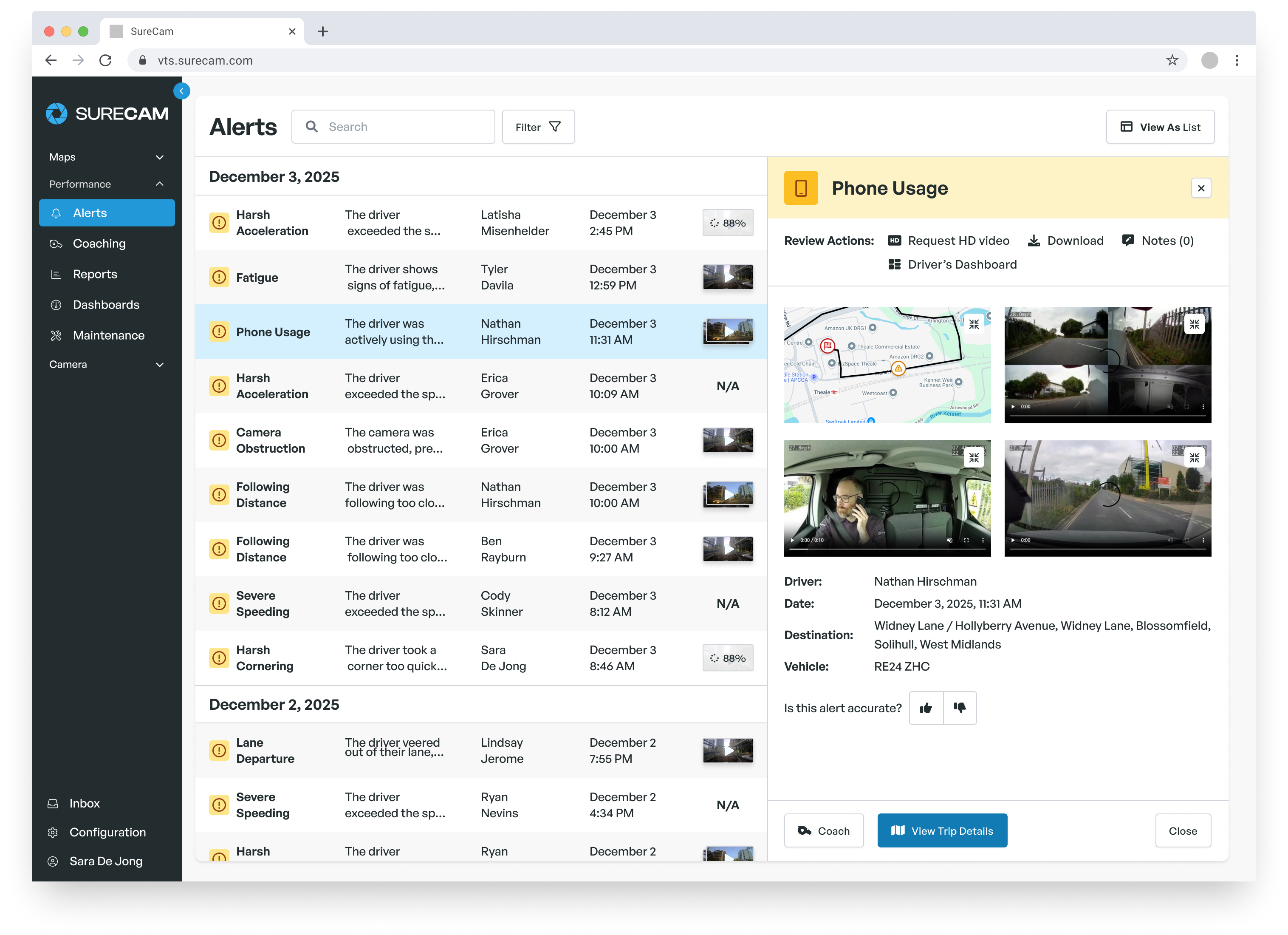
Integration pulls telematics events (harsh braking, speeding, geofence violations) into the same platform as video, enabling unified incident investigation. A harsh braking event triggers video capture and GPS data simultaneously, allowing you to correlate g-force sensors with road context and driver response.
Before selecting a camera vendor, confirm their integration roadmap for your current telematics stack. Some vendors support only one or two platforms, limiting your choices. Vendors with open APIs and flexible integration strategies offer more flexibility if you switch telematics providers later.
Video recording in commercial vehicles is legal throughout the United States and Canada. However, audio recording rules vary significantly by jurisdiction. Some states require two-party consent (both driver and any passengers must consent to audio recording), while others permit single-party recording.
Before deploying in-cab cameras with audio, audit your state and provincial privacy laws. Many fleets address this by recording video only, disabling audio. Others use one-way audio (capturing driver commentary without recording other voices) or provide explicit disclosure and opt-in consent to drivers.
When operating in multiple jurisdictions, design your camera configuration to comply with the strictest rule among your operating regions. This simplifies policy and avoids compliance headaches.
GDPR applies to any fleets operating in the EU or handling EU resident data. Video recording is permitted under GDPR if the purpose is demonstrably necessary (safety, liability defense) and balanced against driver privacy rights. Most GDPR-compliant camera deployments incorporate privacy safeguards: facial blurring in driver-facing footage, limiting audio recording, or disabling in-cab cameras during off-hours.
Privacy impact assessments (PIAs) formalize the balance between safety and privacy. Many vendors provide GDPR compliance templates to streamline this process. UK fleets should follow equivalent ICO (Information Commissioner's Office) guidance, which mirrors GDPR principles even post-Brexit.
Insurance discount ranges vary by carrier and fleet profile. Some insurers offer 5–10% reductions for fleets deploying video systems. Others offer deeper discounts if fleets couple cameras with driver coaching or safety certification programs.
The value emerges not just from upfront discounts but from claims outcomes. Verified video evidence settles claims faster, reduces litigation risk, and diminishes third-party overreach. Over time, a improved claims history lowers experience modification rates (X-mods), compounding the premium benefit beyond the initial discount.
Contact your insurance broker or carrier before purchasing cameras to confirm discount availability and qualification requirements. Some insurers require specific camera features (dual-facing, AI detection) to unlock discounts. Aligning your camera selection with insurer expectations maximizes financial benefit.
ROI timelines vary by fleet size, incident frequency, and insurance situation. Conservative estimates assume breakeven between 12 and 18 months for mid-sized fleets (100–300 vehicles) after accounting for hardware costs, monthly subscriptions, and installation.
Fleets with higher incident rates, frequent third-party claims, or expensive insurance see faster payback. A fleet experiencing one significant accident per month realizes savings quickly. A stable safety record with no accidents still benefits from insurance discounts and avoided legal liability.
Frame the investment to leadership as protection against downside risk rather than a cost center. A single nuclear verdict (jury award exceeding one million) can eliminate years of operational profit. One avoided false claims against a fleet driver justifies months of subscription costs.
Yes. Video evidence dramatically shortens claim resolution timelines. Yuill & Dodds Ltd., a 100-vehicle Scottish haulage and transport company, uses video to combat "crash for cash" schemes and exaggerated injury claims common in the UK. In one documented case, a video showed a third-party vehicle deliberately braking without cause in front of a Yuill & Dodds truck. The video immediately shifted liability and eliminated a potential claim payout. In another case, footage contradicted a passenger's injury claim, showing the passenger fit and mobile before mysteriously being carried away on a stretcher.
Claims adjusters and insurers accelerate processing when video corroborates the reported sequence of events. That speed reduces reserves, accelerates cash recovery, and frees your team from prolonged disputes. Conversely, the absence of video often defaults to "he said, she said" scenarios where the insured absorbs costs or extends the claim lifecycle.
Coaching effectiveness depends on tone and framing. Present dashboards and event review conversations as development opportunities, not disciplinary tools. Celebrate safe driving with recognition programs. Use harsh event footage (aggressive braking, speeding) as teaching moments, not gotcha moments.
Monthly safety dashboards distributed to the entire team normalize the process and position cameras as a fleet-wide accountability tool rather than a surveillance system targeting individuals. Some fleets pair camera events with incentive programs: drivers with zero harsh events in a given month earn bonuses or public recognition.
The tone you set during rollout carries forward into driver perception. If leadership frames cameras as "we're watching you," resistance hardens. If the message centers on "we're supporting your safety and protecting you from false claims," drivers become advocates.
Yes. Network-connected cameras with live streaming capability allow real-time video access to any vehicle. This supports multiple operational use cases: verifying job site arrival (construction, maintenance), monitoring active incidents in progress, or confirming safety compliance at hazardous locations.
Live streaming capability adds value beyond claims response. Maneri Traffic Control, a California traffic control and signage company, uses live video monitoring to conduct daily safety audits of highway work zones.
Supervisors remotely verify that crews are using proper equipment and following safety protocols, even though crews work across multiple distant locations. That real-time visibility strengthens safety culture and enables rapid intervention if compliance issues appear.
Live video also supports customer service, allowing you to provide proof of service completion or route compliance during customer calls. The transparency reduces billing disputes and strengthens customer confidence.
Most fleets estimate 15–20 minutes per day for a safety manager or fleet director to review priority events (collisions, harsh events, near-misses). Self-managed systems present only flagged events, filtering out routine driving. That reduces review burden compared to sorting through hours of continuous footage.
A 50-vehicle fleet might generate 10–15 priority events per day, depending on driver behavior and g-force sensitivity thresholds. A 200-vehicle fleet might see 50–75 events daily. Filtering to high-priority categories (collisions only, harsh events combined with speeding) further focuses coaching capacity on the highest-impact scenarios.
Versus fully-managed services, where the vendor reviews footage and generates coaching reports, self-managed systems shift review time to your team but reduce subscription costs and accelerate response. Choose based on available internal resources.
Modern video telematics platforms integrate with most major ELD providers. Integration pairs Hours of Service data with vehicle video, enabling coordinated compliance monitoring. Some platforms also surface vehicle diagnostics (engine codes, maintenance alerts) alongside video and telematics data.
For fleets with safety and compliance responsibilities, the integrated data stream reduces context switching across multiple tools. A DOT inspection question can pull ELD records, GPS history, and video evidence from a single platform rather than toggling between three vendors.
Before purchasing, map your current compliance tech stack (ELD provider, telematics platform, maintenance software) and confirm integration support. Misalignment creates silos that reduce operational efficiency and complicate training.
Network-connected cameras store video locally on SD cards when the cellular signal drops. Once connectivity resumes, buffered footage uploads automatically to the cloud. Critical event footage (collisions detected by g-sensors) uploads with higher priority, ensuring incident documentation reaches the cloud even if connectivity is intermittent.
Fleets operating in rural or remote areas with spotty coverage should discuss buffering and storage capacity and upload prioritization with vendors. Most systems handle extended offline periods gracefully, but very remote operations might benefit from secondary local storage options.
Create a vendor scorecard addressing functionality, pricing, support, and strategic fit. Ask each vendor the same questions to enable side-by-side comparison. Key criteria include: camera hardware reliability (warranty, replacement policy), hardware shipping times, installation flexibility (professional vs. self-install options), web application usability, integration roadmap, and customer support responsiveness.
Request references from existing customers in your industry. Talk to three to five customers, not the two or three the vendor provides. Ask specifically about surprise costs, integration timelines, and support quality during the first 90 days.
Run a proof-of-concept with the top two vendors before committing to a full fleet deployment. Pilot on 10–15 vehicles for 60 days to validate real-world performance, user adoption, and operational impact before scaling.
Expect support availability across phone, email, and text channels. Response time to critical issues (system outages, data loss) should be four hours or faster. Non-critical issues typically resolve within 24 hours.
Ask whether you get a dedicated account representative or a shared support queue. Dedicated reps streamline vendor communication and create accountability. Shared support often involves repeated explanations to different agents.
Confirm support includes new customer onboarding training, whether in-person or virtual. Strong vendors provide documentation, video walkthroughs, and ongoing education as features expand. Weak support leaves you searching for answers on your own. Ready to see how SureCam can work for you? Click here to schedule a call with a video telematics professional today.